








As Owen McGirr navigates the digital world, he makes his own way and shares that way on the Google App Store. McGirr, founder of Switchify, brings his skill and experience to the app that makes Android phones more accessible for users with physical and limited movement disabilities. McGirr, a software developer with cerebral palsy, works to close the gaps in existing assistive technology to promote ease of use and independence when using the latest smartphone technology. Switchify app is a customizable smart phone interface for use with various adaptive switches.
In a virtual interview with ABILITY Magazine’s Gina Velasquez, McGirr discusses his motivation to develop Switchify and its purpose of technological empowerment for people with a wide array of physical disabilities. He also provides a detailed description of the app’s features, how it works and how users who are blind and have physical disabilities can use it.
Gina Velasquez: Could you tell me a little bit about yourself?
Owen McGirr: I’m a software developer from Donegal, Ireland. I was born with cerebral palsy, which has shaped not only my daily life, but also my professional journey. From a young age, I understood the barriers that people with disabilities face and the importance of assistive technology in breaking them down.
In secondary school, I began to experience just how transformative assistive technology could be. I relied on AAC, augmentative and alternative communication, tools to express myself using software that converted my typed messages into spoken words. While this was empowering, I also encountered the limitations of available technology. Many tools were either difficult to use, overly expensive, or not tailored to my specific needs. These experiences planted the seed for what would become my passion for creating accessible user-focused technology.
Products & Services

After secondary school, I attended Atlantic Technological University (ATU) where I studied software development. My time at ATU was both challenging and rewarding. While many aspects of university life required me to adapt, my passion for coding and problem solving kept me motivated. It was here that I began to see how my skills as a developer could intersect with my experiences as a person with a disability. I realized that I could not only use technology to help myself but also create tools to help others.
One of my early projects was Sayit!, an AAC app designed to provide a simple and effective voice output for nonverbal users looking for an accessible, easy-to-use solution. It aimed at addressing affordability and simplicity, making it a good fit for those who didn’t need complex systems. Although I’ve since discontinued its development, it marked an important milestone in my career. It showed me the impact that well-designed assistive technology could have and inspired me to keep pushing forward.
Velasquez: How did creating Sayit! Show you its impact on non-verbal users?
McGirr: SayIt! taught me how essential usability is in assistive tech, and that lesson directly influenced the work I do today.
Velasquez: Why did you discontinue developing it?
McGirr: I discontinued development because I wanted to focus on projects that would have a broader impact. Today, my focus is on Switchify, an open-source Android app that improves Switch access functionality. My personal journey from navigating school with AAC tools to fighting to overcome accessibility barriers in daily life has been the driving force behind my work. I believe that no one should have to struggle to access technology, and I’m committed to creating tools that empower people to live more independently and with dignity.
Velasquez: Back to your time at ATU, I’m curious about your experience getting through the traditional system, if that was something that was difficult.
McGirr: I was very lucky, I would say. For exams, I was given extra time, and the social aspect wasn’t really that different. I was always included. I got in trouble like anyone else. Yes, I’m very lucky.
Velasquez: So, you were in the traditional educational environment?
McGirr: Yeah.
Velasquez: And the technology was there for you as you were growing up?
McGirr: Yeah. Well, it has come a long way since.
Velasquez: I see. But there was enough for you when you went through school. I mean, you graduated from university with a degree in computer science.
McGur: It was enough to get by.
Velasquez: You mentioned that you’re now focusing on Switchify, the app that you created. Can you tell me more about that and describe how it works?
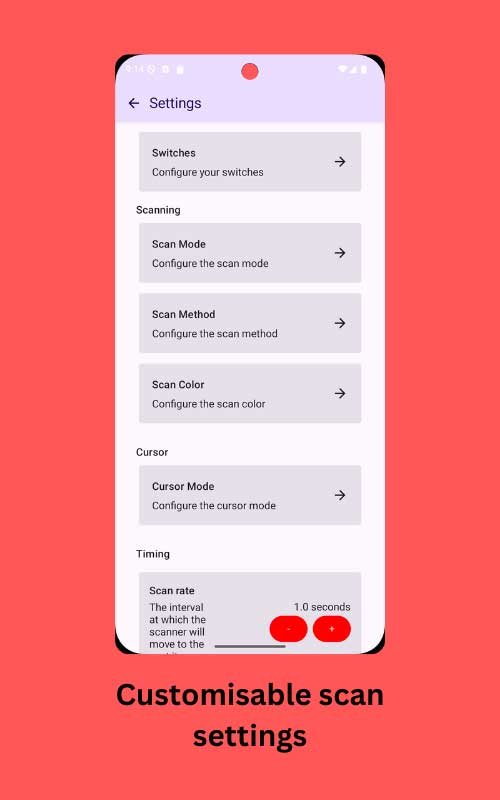
McGirr: Switch access is a way to control a device without using a touch screen, mouse, or keyboard. Instead, it uses something called a Switch. A Switch can be a button, a pedal, or even a head sensor, something that can be pressed or activated by a simple movement. Think of it like this.
Imagine you can’t use your hands to touch a screen or type on a keyboard. The switch lets you interact with the device by doing something simple, like pressing a button with your head or foot. The way it works is through something called scanning.
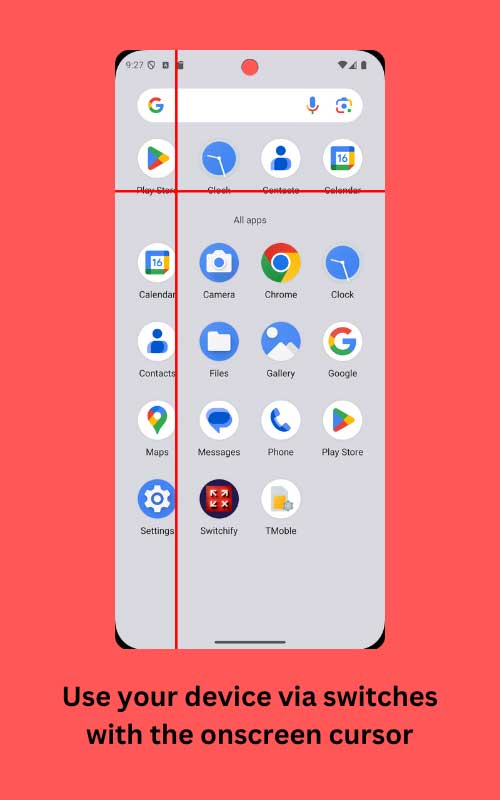
Picture a box moving across the screen. It highlights different things, like apps or letters on a keyboard. When the box reaches what you want, you press the switch to choose it. For example, if you want to open an app, the box moves from one app to the next. When it highlights the right one, you press the switch and the app opens. Switch access also works for typing.
Products & Services


Imagine a keyboard on the screen. The box moves through each row of letters. When it reaches the right row, you press the switch. Then it scans through each letter in that row, and you press the switch again when it highlights the one you want. This system allows people with limited movement to use devices like phones or tablets, even though it takes a little longer. It gives them the ability to do things like browse the Internet, send messages, or make phone calls using just a single switch in simple movements.
Switchify takes this system and makes it better. It allows people to customize how the scanning works, use advanced gestures, and interact with their devices in ways that are faster and more flexible than standard options.
Velasquez: What kind of switch is normally used with a cell phone?
McGirr: A common switch used with cell phones is a simple button switch, such as the Jelly Bean or Buddy Button, which connects via Bluetooth or through a specialized interface like AbleNet’s Blue2.
Velasquez: Does a phone switch incorporate a stenography notation type system for ease of conversation and to avoid overtaxing users? For comparison, there’s contracted Braille, which is a notation system to indicate larger patterned words for ease of reading. How do you operate a cell phone switch?
McGirr: Switches are operated by small movements—pressing a button, tilting the head, or even blinking. They don’t use a stenography-style notation system. Instead, scanning interfaces highlight options sequentially, and the user activates the switch when their desired choice is highlighted. The simplicity of scanning systems prevents overtaxing AAC users, as it eliminates the need for rapid or complex input while still enabling full control over the device.
Products & Services

Velasquez: Is Switchify software alone, or is it software plus a hardware device,
McGirr: It is an app, and you do need Switches, which you can buy from people like AbleNet.
Velasquez: What is AbleNet? Ime not familiar with them.
McGirr: AbleNet is a company that specializes in assistive technology for people with disabilities. They offer devices like switches, mounts, and communication systems designed to make technology more accessible to those with limited mobility or communication challenges. These tools are particularly helpful for Android and iPhone users who need alternative access solutions.
Velasquez: So you need switches, and then you attach them to your Android device?
McGirr: Yeah.
Velasquez: And then your Switchify app is free, correct?
McGirr: Yes.
Velasquez: Is Switchify Android-based only, or is it also available for iPhones or Apple devices?
McGirr: It’s just Android, simply because it is the platform that the tools were the least developed for, and I wanted to change that.
Velasquez: Right, and was this because there was no motor accessibility or little motor accessibility for Android devices?
McGirr: Exactly.
Velasquez: From the perspective of being blind, I was listening to your description of how the Switchify technology works with the box moving around, and that’s how you know when to touch a button or switch to select something. I was thinking that a blind person would not be able to use either Switchify or something similar if they’re also not able to type.
McGirr: Switchify was primarily designed for individuals with physical disabilities, but I’m actively working on expanding its usability to benefit people with visual impairments as well. This means ensuring the app not only functions well for Switch users, but also integrates accessibility features that make navigating the interface easier for those who rely on auditory feedback.
One of the major updates I’ve developed is to include the ability for Switchify to read out the elements on the screen as they are scanned. For example, as the scanning box moves across buttons, apps, or menu items, the app will announce what each element is, allowing visually impaired users to know exactly what they’re selecting. This will provide a regulatory cue, making the experience intuitive and functional for those who can’t rely on visual input.
This enhancement bridges the gap between Switch Access and screen reading technologies. By combining the two, Switchify can become more inclusive, ensuring that individuals with both physical and visual disabilities can benefit from its functionality. It’s a challenging but exciting development, and I believe it will open up even more opportunities for people to interact with their devices independently. Ultimately, my goal is to make Switchify accessible to as many people as possible. Everyone deserves tools that empower them to interact with technology on their own terms, and adding features for visual impairments is a step closer to that vision.
Velasquez: Absolutely. And what has been the response to the Switchify updates for people with visual impairments.
McGirr:The update for users with visual impairments has been received positively. I’ve had feedback from some users testing the new screen reader compatibility. And while there’s always room for improvement, I’m encouraged by the progress. Expanding accessibility features is an ongoing priority for me, and hearing directly from users helps guide my work.
Velasquez: Is this a hard system to learn? Being a JAWS (screen reader for blind and visually impaired people) user, I know it takes a while to learn all the basic commands. You need a bit of an education to become proficient. Where do switches stand on that spectrum of ease of learning to use?
McGirr: This is a good question. I’ve been a Switch user since day one, and I’d say it takes a lot to learn. Unfortunately, I’m not the best person to ask because to me, it’s like second nature.
Velasquez: I realize I’m likening Switchify to the computer screen reader I use, JAWS. I think Switchify is more like Voiceover (screen reader) for the Apple products. Is that correct?
McGirr: Yes.
Products & Services

Velasquez: And Apple’s Voiceover, app for the blind and visually impaired, as you know, is all gesture related. You hear something like text content or the element that has focus, and then with your fingers you flip to the left or to the right to select an action, You navigate entirely with gestures. With Switchify, you watch the movements of something switching to the left or to the right, and then you select a choice when the focus lands where you want it. So, I feel like that’s a sort of way to describe the similarity. Is that correct?
McGirr: Yeah. A long time ago, we used to have to hack Voiceover to use with switches.
Velasquez: Can you tell me more about that?
McGirr: A long time ago, to use switches on iPhones, we had to create workarounds (or hacks) to make Apple’s VoiceOver screen reader compatible with switches. This was because switch support wasn’t natively available on iPhones then.
Velasquez: So, this was the only way for you to use iPhones back then? With hacks? How long ago was this?
McGirr: Yes, hacking VoiceOver was essentially the only way for people with mobility disabilities to use iPhones with switches back then. Thankfully, accessibility has come a long way since. This was about 10–15 years ago.
Velasquez: Is there anything you want to add about the Switchify app?
McGirr: I’d like to add that funding is really important for me to keep improving Switchify and making it more accessible for everyone. I’m working hard to add new features and support users, but this requires ongoing resources. If anyone would like to get involved or support the project, they can reach out to me directly or contribute through the Indiegogo campaign. Any support goes a long way in helping me continue developing the app and making technology more inclusive.
Thanks again for having me.